Docker Compose: Auto update containers using only Bash
Setting up the structure
If you’re using Docker compose for having a declarative way to run your containers you might have found out that updating it requires some manual work. In this example we automate it using the following structure:
- Folder: /opt/docker-compose
- Container folders: /opt/docker-compose/«container»
Below is an example of my structure:
[root] docker-compose# ls -ld /opt/docker-compose/*
-rw-r--r-- 1 root root    0 Sep 11  2023 /opt/docker-compose/README.md
drwxr-xr-x 2 root root 4096 Sep 13  2023 /opt/docker-compose/bazarr
drwxr-xr-x 2 root root 4096 Sep 11  2023 /opt/docker-compose/deluge
drwxr-xr-x 2 root root 4096 Sep 16 15:51 /opt/docker-compose/homeassistant
drwxr-xr-x 2 root root 4096 Jul 26 10:04 /opt/docker-compose/jellyfin
drwxr-xr-x 2 root root 4096 Sep 13  2023 /opt/docker-compose/jenkins
drwxr-xr-x 2 root root 4096 Oct  1 10:14 /opt/docker-compose/openvpn
drwxr-xr-x 4 root root 4096 Sep 13  2023 /opt/docker-compose/pihole
drwxr-xr-x 2 root root 4096 Sep 11  2023 /opt/docker-compose/radarr
drwxr-xr-x 2 root root 4096 Dec  4  2023 /opt/docker-compose/ring-mqtt
drwxr-xr-x 2 root root 4096 Sep 11  2023 /opt/docker-compose/sonarr
-rwxr-xr-x 1 root root  349 Sep 11  2023 /opt/docker-compose/update.sh
drwxr-xr-x 2 root root 4096 Sep 13  2023 /opt/docker-compose/vaultwarden
drwxr-xr-x 3 root root 4096 Oct  1 10:33 /opt/docker-compose/your_spotify
All these folders contain a docker-compose.yaml or compose.yaml file which the docker-compose command will look for when executing commands like docker-compose up -d.
The update script
Place the update script in /opt/docker-compose/update.sh:
#!/bin/bash

## Variables
SCRIPT_DIR="$( cd "$( dirname "${BASH_SOURCE[0]}" )" &> /dev/null && pwd )"
RED="\e[31m"
ENDCOLOR="\e[0m"
DIRS=$(find $SCRIPT_DIR/* -type d)


## Update
for DIR in $DIRS
do
        echo -e "${RED}Checking update for ${DIR}...${ENDCOLOR}\n"
        cd $DIR
        docker-compose pull
        docker-compose up -d --remove-orphans
        cd $SCRIPT_DIR
done
Make it executable by setting the X bit on the script:
chmod 750 /opt/docker-compose/update.sh
You can now run the script manually from any directory to check if it works correctly. Notice the SCRIPT_DIR variable which will automatically look in the folders where the script is located and thus check it’s subdirectories.
SCRIPT_DIR="$( cd "$( dirname "${BASH_SOURCE[0]}" )" &> /dev/null && pwd )"
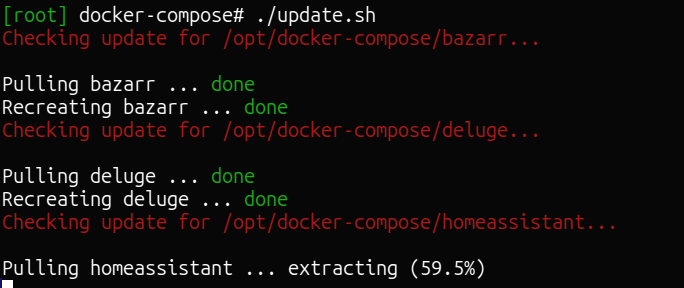
Example script output
Below a screenshot of how the output will look (screenshot, not text because of the colours.)
Setting up a cronjob
Place a cronjob as following to execute script periodically. In this case I placed it in /etc/crontab hence why you see the user (root) argument after the time.
Below example will run it every day at 1 AM:
0 1 * * * root bash /opt/docker-compose/update.sh